All guides
Quarterly Income Tax Return for Corporations, Partnerships and Other Non-Individual Taxpayers
1702Qv2018C: who files, deadline and how to file
BIR Form 1702Qv2018C, often called 1702Q: who files it, its quarterly deadline, what each part asks, and how to send it with Tax Techie.
Last checked November 4, 2026
1702Qv2018C (often called BIR Form 1702Q), the Quarterly Income Tax Return for Corporations, Partnerships and Other Non-Individual Taxpayers, declares the income, and the income tax due, of a corporation or partnership for each of the first three quarters of its year. The fourth quarter goes in the annual return instead. In Tax Techie you fill it in, validate it, and send it with Submit / Final Copy.
Who files it, and when
Who: every corporation that pays income tax, which includes partnerships, joint stock companies, joint accounts, associations and insurance companies. Not a foreign corporation that doesn't do business in the Philippines, nor a joint venture or consortium for construction or energy projects under a service contract with the government. A general professional partnership (formed only to practise its partners' common profession) isn't subject to the income tax, but files a return of its income: its ATC is IC 021.
When: File it within 60 days after each of the first three quarters of the taxable year ends: for a calendar year, the quarters ending March, June and September. If that day is a Saturday, Sunday or holiday, the deadline is the next working day. A taxpayer on a fiscal year (a 12-month accounting year that doesn't end in December) counts the 60 days from the end of each quarter of their own year. The next dates for a calendar year are on the deadlines calendar.
Tax Techie doesn't file through eFPS (BIR's Electronic Filing and Payment System). eFPS filers have their own deadlines.
Before you start
- The taxpayer in Tax Techie, with their TIN (Taxpayer Identification Number), RDO (the Revenue District Office they're registered with) and email address. See how to fill in and validate a return.
- The quarter's figures: sales or receipts, cost of sales, other income, and deductions; and the taxable income of the year's earlier quarters.
- The ATC for the corporation's income (the Alphanumeric Tax Code: BIR's code for a kind of income and its rate, such as IC 010 for a domestic corporation in general). The Page 3 · ATC table tab lists them.
- Its tax credits: income tax paid in the earlier quarters, and any BIR Form 2307 received for tax withheld.
What each part asks
| Part | Items | What to enter |
|---|---|---|
| Return period | 1–5 | Calendar or fiscal year (Item 1), the month and year it ends (Item 2), the quarter (Item 3), whether it amends a return already filed for that quarter (Item 4), and the ATC (Item 5): a code from the list, IC 055 for the minimum corporate income tax (MCIT), or both. |
| I. Background Information | 6–13A | From the taxpayer's profile: TIN, RDO, name, address, zip code, contact number and email address (Items 6–11). The method of deductions: itemized or the optional standard deduction (Item 12). Whether the taxpayer claims tax relief under a special law or tax treaty (Items 13 and 13A). |
| II. Total Tax Payable | 14–26 | The tax due, from the schedules (Items 14–18). Less the tax credits, from Schedule 4 (Item 19). Penalties, if late (Items 21–24). Tax Techie works out the totals, down to the amount payable (Item 25). The number of attachments (Item 26). |
| IV. Schedules | Page 2 | Schedule 1 for income taxed at a special rate, Schedule 2 for the regular rate, Schedule 3 for the MCIT, and Schedule 4 for the tax credits and payments. Each works out its tax as you type. |
Filing it in Tax Techie
-
On the taxpayer's page, click New return, type
1702Q, and choose 1702Qv2018C. -
Choose Calendar or Fiscal first (Item 1): Tax Techie opens Item 2 only then. Type the year (Item 2; for a fiscal year, choose its last month too), choose the quarter (Item 3), answer Item 4, and choose the ATC (Item 5). Answer Items 12 and 13.
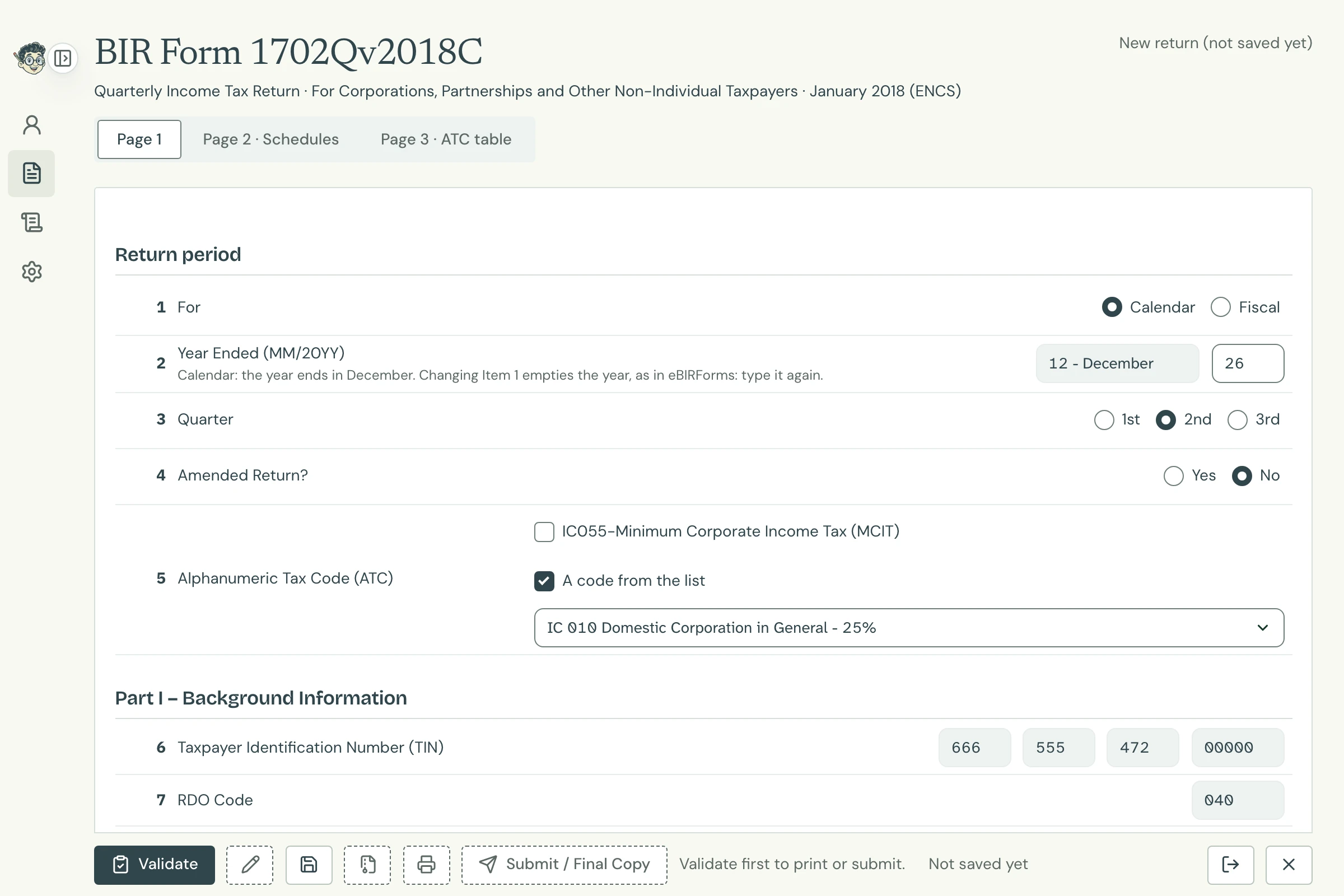
Page 1 Open full size -
Click Page 2 · Schedules and type the quarter's figures in the schedule for its ATC. Tax Techie fills in the rate and works out the tax due, and carries it to Part II.
-
In Schedule 4, type the tax credits. For other credits, Item 6 has two rows, a and b. For more than two, type row b's amount, then click Add row: row b's own rows open under it. Type each one, then click Save and Close: row b becomes VARIOUS with their total. To change them later, click Change row b's rows.
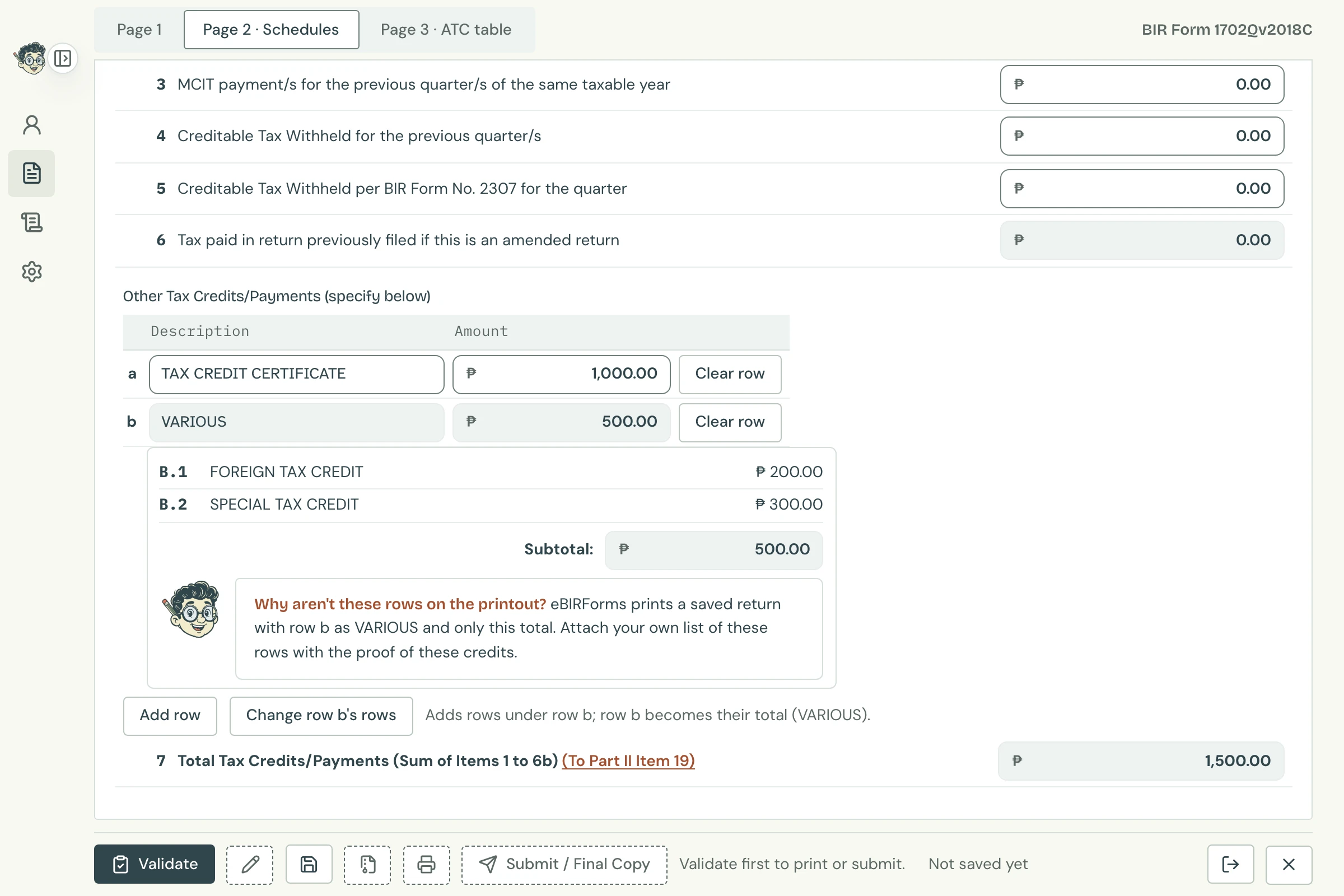
Schedule 4, Item 6 Open full size -
Click Validate, then Save, then send it with Submit / Final Copy.
Its printout is six sheets, as Offline eBIRForms prints it: each of the three pages is followed by an Item 6 sheet, which shows only the total of row b's rows.

Why does the printout show row b as VARIOUS? Tax Techie prints a saved return as Offline eBIRForms does: row b reads VARIOUS with its total, and its own rows aren't listed. Attach your own list of them with the proof of these credits.
Messages for this form
Tax Techie shows BIR's Offline eBIRForms messages word for word. The ones you're most likely to see:
| Message | What to do |
|---|---|
In Item 1, choose Calendar or Fiscal. |
Tax Techie's own: choose Calendar or Fiscal in Item 1 before anything else. |
In Item 2, choose the month the fiscal year ends. |
Tax Techie's own: for a fiscal year, choose its last month in Item 2. |
Please select Quarter in Item 3. |
Choose the quarter in Item 3. |
Please select ATC on Item 5. |
Choose the ATC in Item 5: a code from the list, IC 055, or both. |
Please select Method of Deductions on Item 12. |
Choose itemized or the optional standard deduction in Item 12. |
Please specify Special Law/International Tax Treaty on Item 13A. |
Item 13 says Yes: type the special law or treaty in Item 13A. |
Please specify Other Tax Credits/Payments on Schedule 4 Item 6 |
An Item 6 row has an amount but no description: type what it is. |
Future filing is not allowed. |
For a fiscal year: the quarter in Item 3 hasn't ended yet. File it once it has. |
Year (Page 1 Item 2) should not be earlier than January 2018. |
1702Qv2018C is for 2018 onwards. Earlier years use the old version, in BIR's Offline eBIRForms. |