All guides
Submit / Final Copy: send a BIR return and check it arrived
What Tax Techie does when you send a return with Submit / Final Copy, what each result means, and what to do next.
Last checked November 12, 2026
Send a validated return to BIR with Submit / Final Copy, then read the result: Sent, not sent, or not confirmed.
Before you start
- A validated return. See how to fill in and validate a return.
- An internet connection.
- The taxpayer's email address, correct in their profile. BIR sends its confirmation there.
Steps
-
With the return validated, click Submit / Final Copy at the bottom of the return.
-
Tax Techie asks
Send this return to BIR now, or preview it first?, and says which address BIR emails its confirmation to: check that it is right. Nothing goes online until you click Send. Signed in, the line under it says what sending uses: a credit, or that filing is free.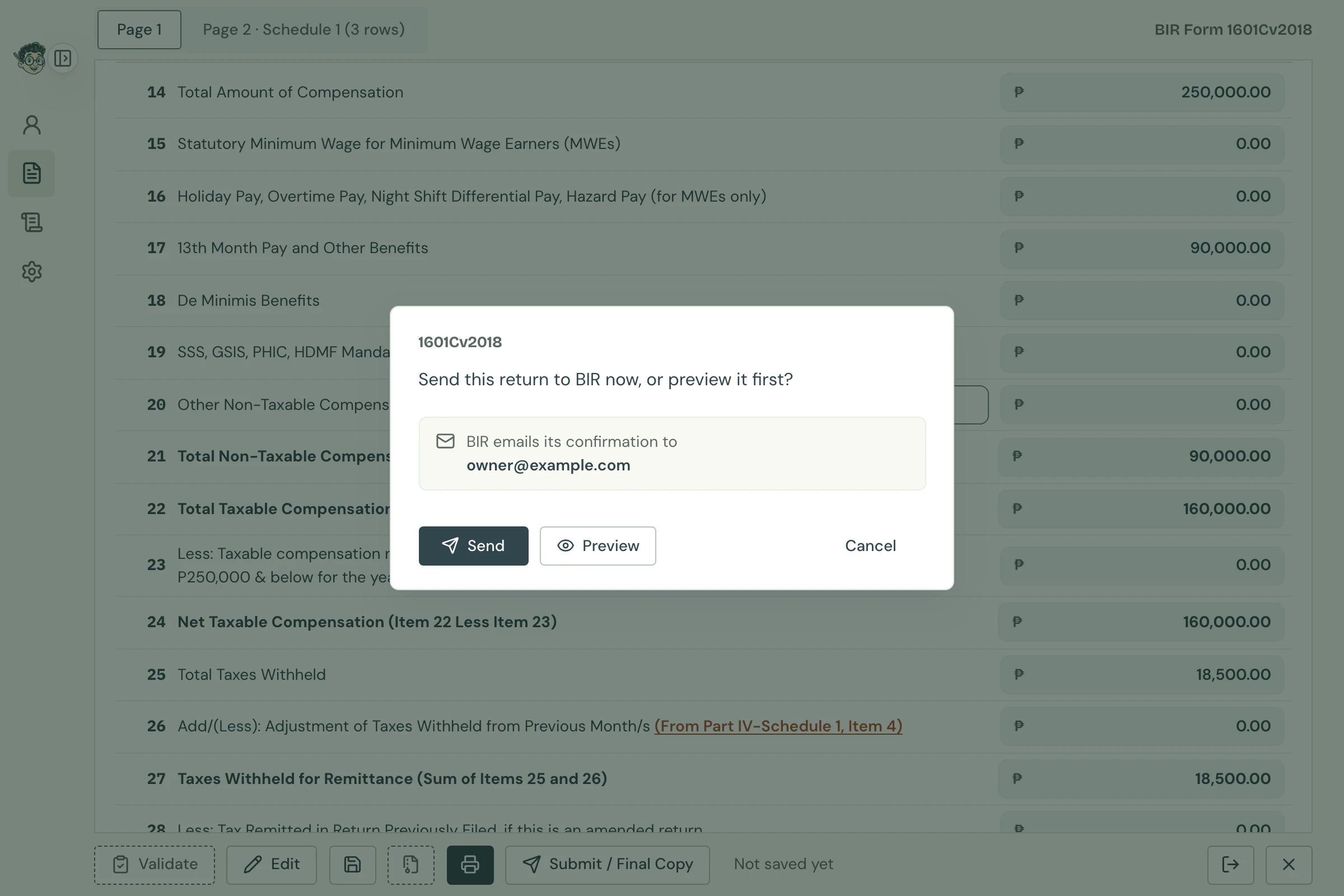
Send or preview Open full size -
Send sends it.
-
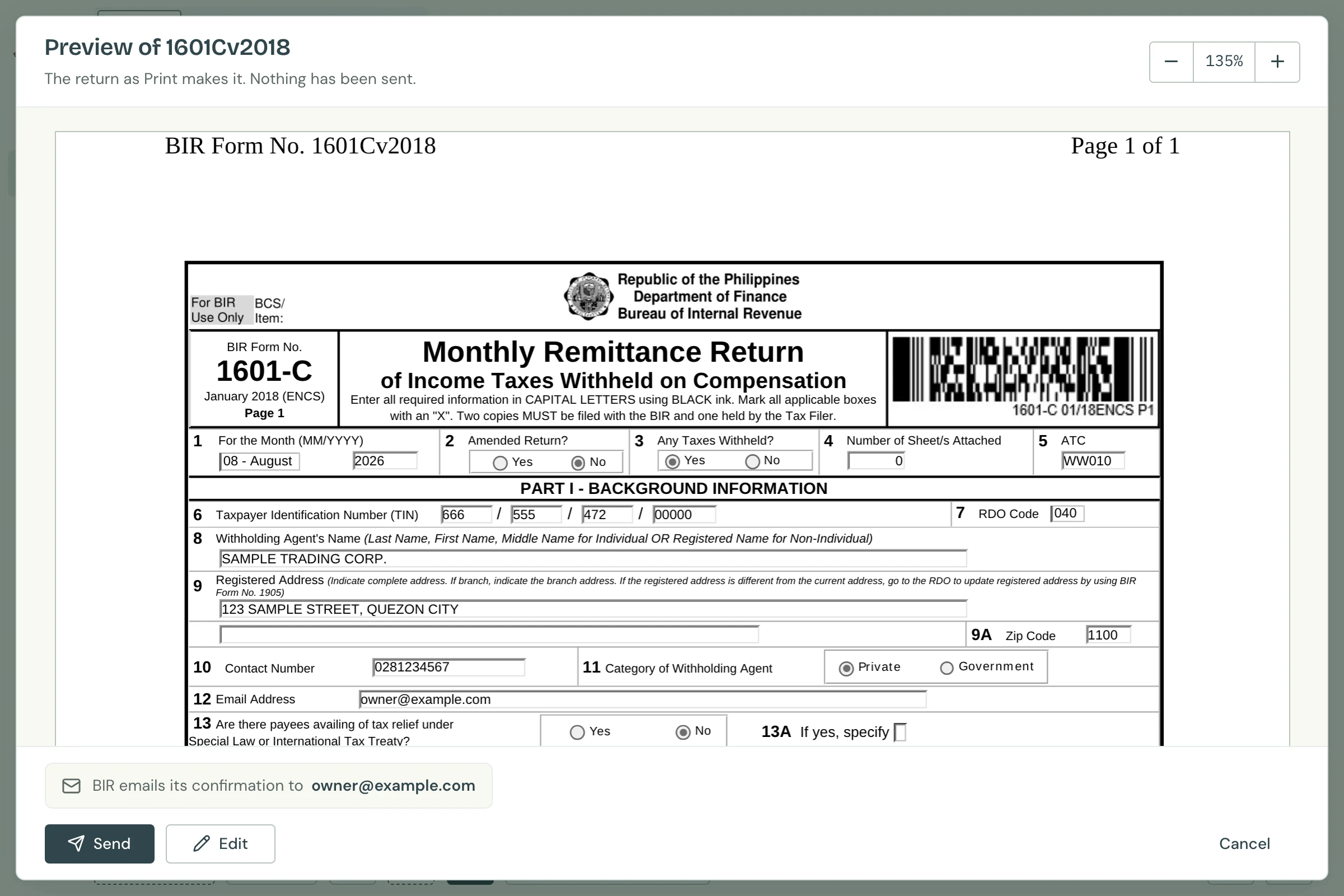
Preview shows the return as Print makes it, before anything is sent. If it has changes not saved yet, Tax Techie asks to save it first, as Print does. Then, in the preview, click Send to send it, Edit to change something (the fields open, and you validate again before sending), or Cancel to go back with nothing changed. Preview is offered where the return can be printed.
Coming in the next release of Tax Techie: Preview and the Submit Successful screenshot aren't in version 0.2.1 yet.
-
Cancel goes back to the return. Nothing is sent.
Preview Open full size -
-
Tax Techie sends the return, with a progress bar:
- It asks BIR where to send it. If BIR's main server doesn't answer, it asks BIR's backup.
- It checks the BIR server first, before your final copy is made. If the BIR server can't take your return, Tax Techie stops there and your return stays as it was.
- It sends the return, showing each stage: connecting, sending, then the BIR server's answer.
- It reads your return back from the BIR server and compares it with the file it sent. Where a server won't let it read back, it checks the name and size, and says so.
-
Tax Techie shows the result. If it was sent, the message is eBIRForms' own, word for word, followed by how Tax Techie checked it, the form, the TIN, the period and the time.
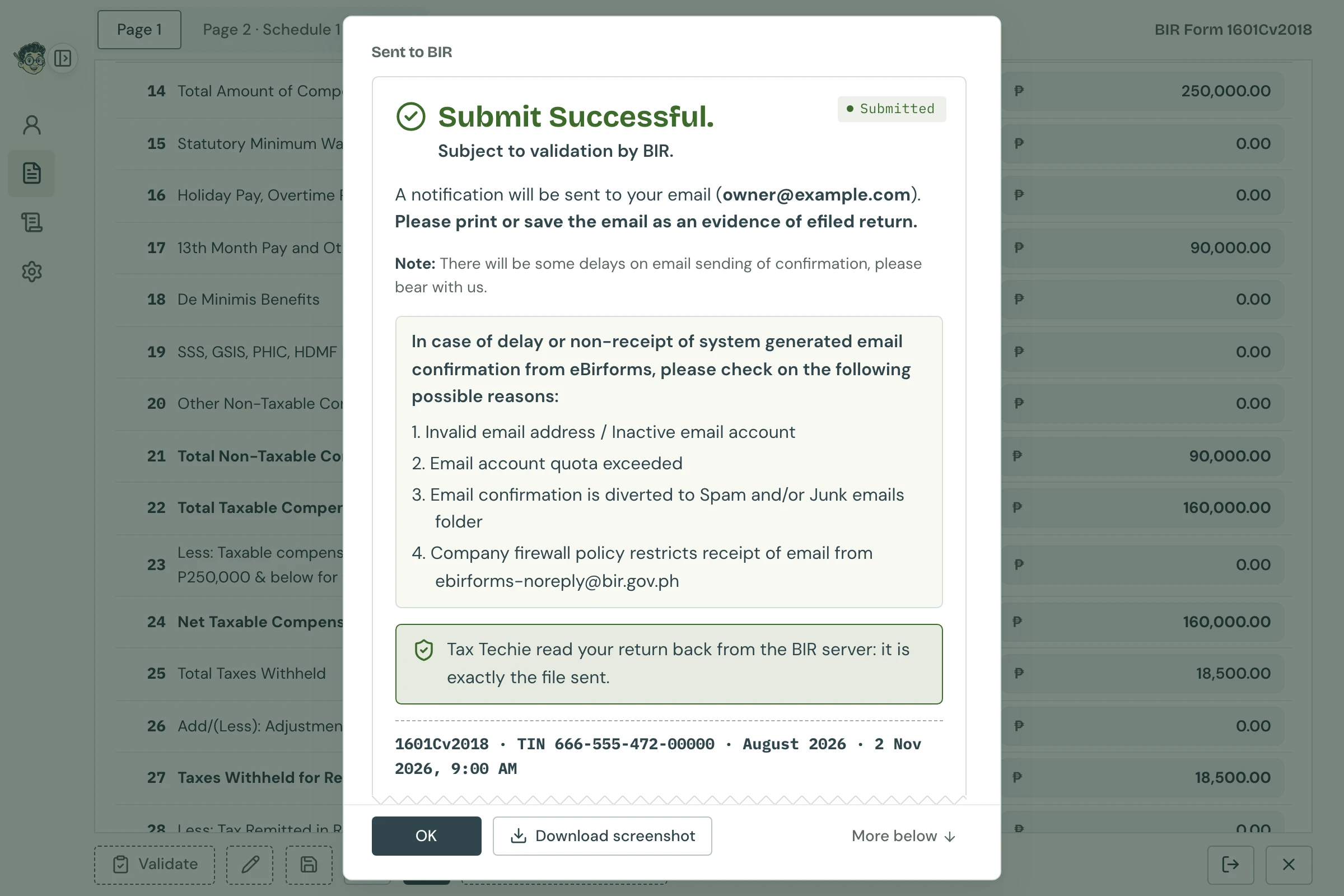
Sent Open full size To keep a screenshot of the result as eBIRForms shows it, click Download screenshot and choose where to save it. See the Submit Successful screenshot.
-
Click OK. As in eBIRForms, a box then lists the ways to pay electronically, with a link to BIR's ePay page. Click Close when you're done.
-
Check the taxpayer's email for BIR's confirmation, and keep it as your proof of filing.
What each result means
Sent
The message starts Submit Successful. Tax Techie found your return on the BIR server, whole. BIR then emails its confirmation to the taxpayer's address; it may take a while. The return is saved as a final copy and can't be changed.

Why keep BIR's email? BIR's confirmation email is your proof of filing, not Tax Techie's message. Print it or save it, as eBIRForms' own message asks.
Not sent
The message starts Your tax return was not submitted: it was not sent to BIR. It says why: for example, no internet connection, or the BIR server not answering. Nothing reached BIR. Read what the message says to do, then use Submit / Final Copy again.
Not confirmed
The message starts Your tax return was sent to the BIR server, but it is not yet confirmed as filed. The BIR server took the file, but Tax Techie couldn't check it there afterwards. It doesn't count the return as sent, so Submit / Final Copy still offers to send it again. Tax Techie then asks Send this return to BIR again, or preview it first?, and its preview has Close instead of Edit: a final copy is sent as it was saved.
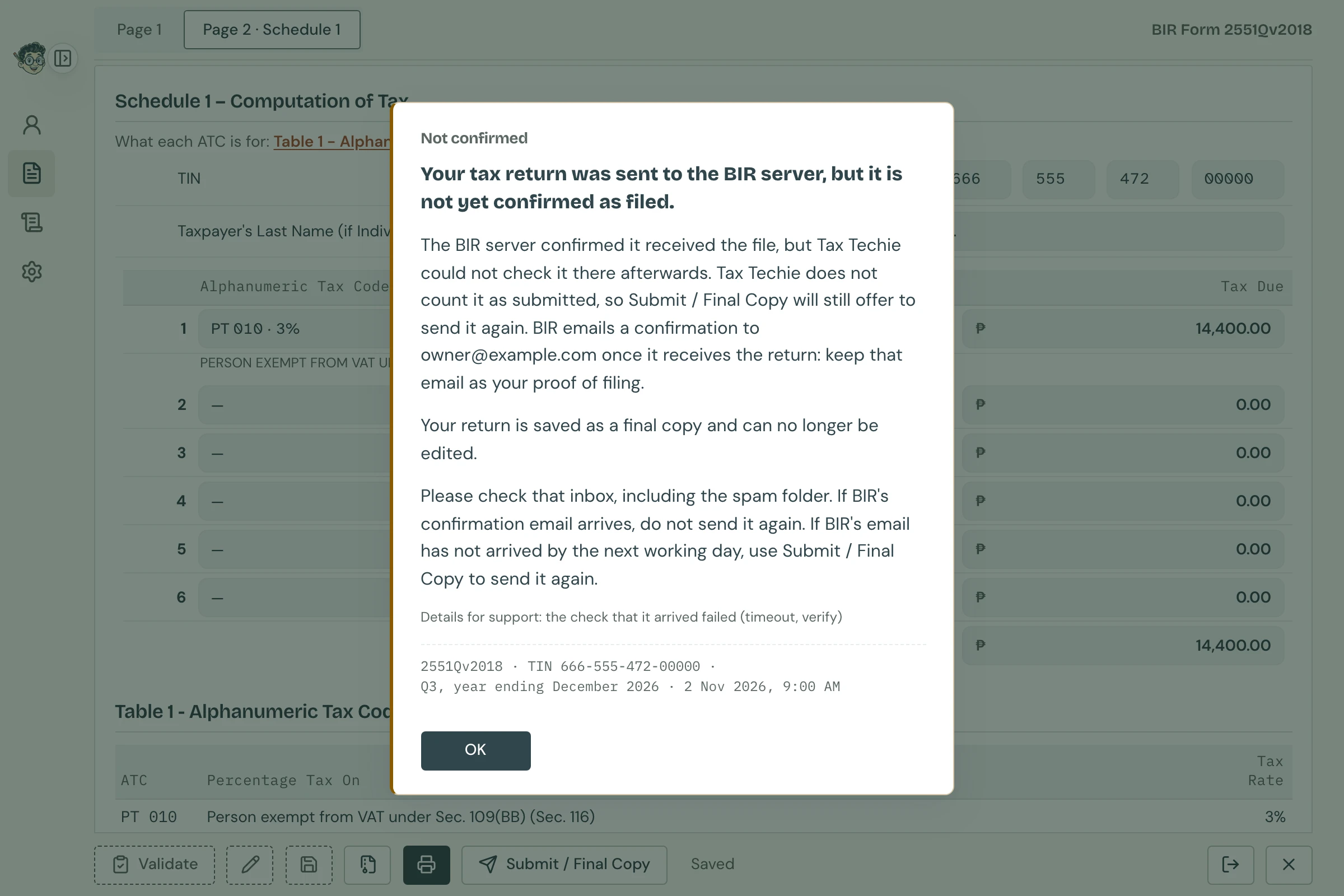
Do what the message says: Please check that inbox, including the spam folder. If BIR's confirmation email arrives, do not send it again. If BIR's email has not arrived by the next working day, use Submit / Final Copy to send it again.
If the message starts Your tax return may not have been submitted: Tax Techie cannot tell whether it reached BIR., Tax Techie couldn't tell whether any of it reached BIR. Do what the message says in the same way. If it says Tax Techie's server keeps looking for your return, a message titled Arrived on the BIR server comes up if the server finds it (see the tip below).
Can it still be confirmed later? Yes. For 7 days after it shows as Not confirmed, Tax Techie's server keeps looking for your return on the BIR server: if it finds the whole file there, a message titled Arrived on the BIR server says so while Tax Techie has the return's data folder open (or the next time it does), and the return shows Sent.
The Submit Successful screenshot
Coming in the next release of Tax Techie: Preview and the Submit Successful screenshot aren't in version 0.2.1 yet.
Many taxpayers keep a screenshot of eBIRForms' Submit Successful message with their records. Download screenshot, beside OK on a Sent result, saves one as a PNG picture. It shows eBIRForms' own message box, with its words for the form, over the form's window, as Windows shows them. The clock in the corner shows when Tax Techie confirmed the return on the BIR server, in Philippine time.
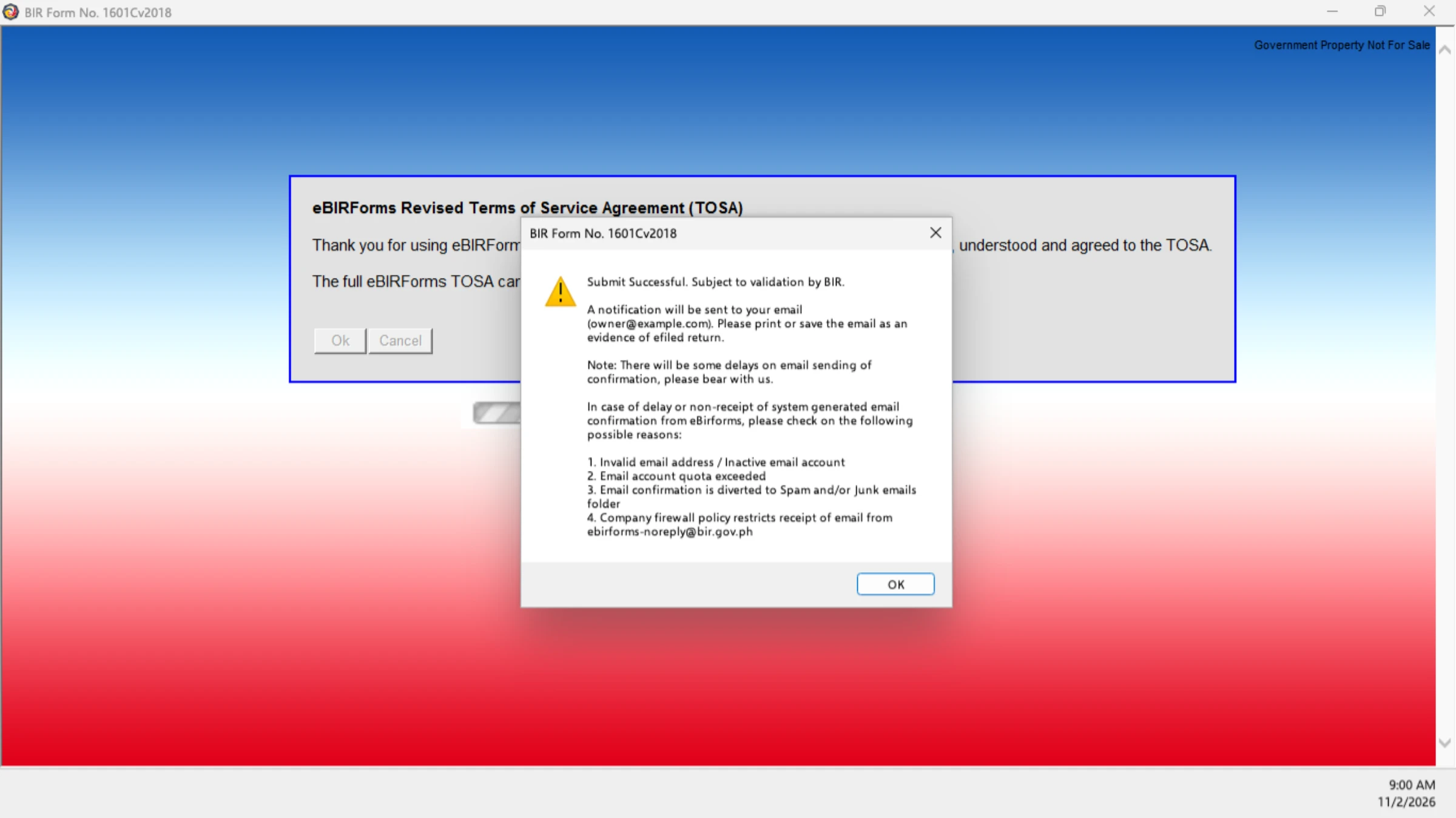
- It is made once, when the return is sent, and kept with the taxpayer's records on this computer. Every download, from the result or from Submission history, saves that same picture.
- Its name is the return's file name, then
Submit Successfuland the date and time, for example00011122500000-1601Cv2018-092026 Submit Successful 2026-11-10 1432.png. - Only a Sent return has one. A return not sent or not confirmed doesn't.
- With the Cloud Vault, the screenshot is kept there too, beside the return's other files.
Is the screenshot proof of filing? No. As for eBIRForms' own message, BIR's confirmation email is your proof of filing. Keep the screenshot with it, as you would a screenshot from eBIRForms.
Your saved returns and their status
Each taxpayer's page lists their saved returns, with each one's status. Show only some with the status buttons, or one form with All forms.
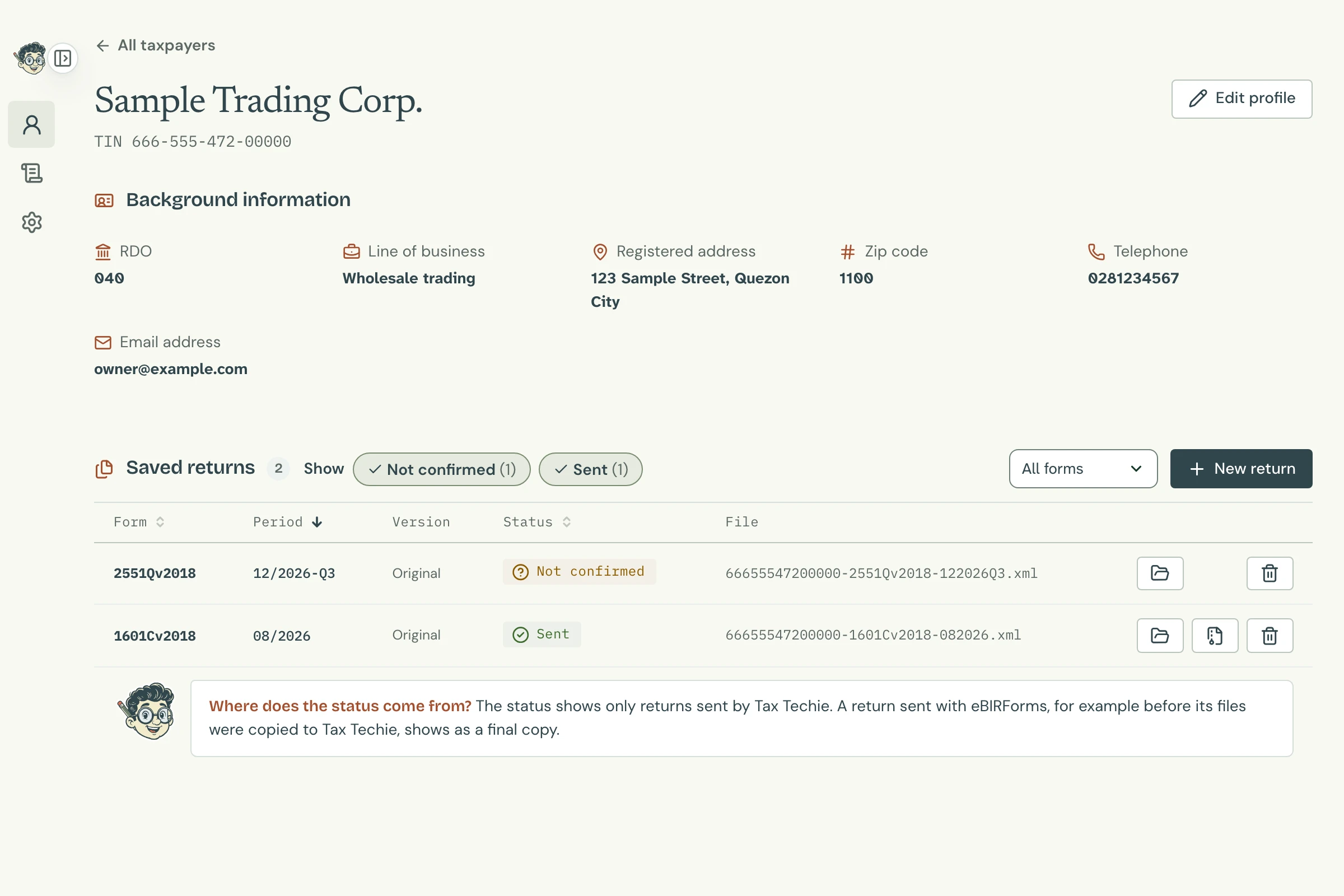
| Status | What it means |
|---|---|
| Draft | Saved, and can still be changed. |
| Final copy | Can't be changed. Tax Techie has no record of sending it: for example, a final copy made in eBIRForms. |
| Sent | Sent by Tax Techie, and confirmed on the BIR server. |
| Not confirmed | Sent by Tax Techie, but not confirmed. Check the taxpayer's email for BIR's confirmation. |
| Status unknown | Tax Techie couldn't read the return's file to show its status. |
Point to a status to see when the return was sent, and where BIR's confirmation goes.
Export, beside a Sent return, saves its final copy as a zip file, to keep or to give to someone else. The zip also has the return's Submit Successful screenshot, one for each time it was sent.
Every result is also kept, word for word, in Submission history, in the sidebar. Click one to see its message again. A Sent one also has Download screenshot: for a return sent before Tax Techie made screenshots, it makes one then.
Questions
Does Tax Techie say BIR accepted my return?
No. Only BIR can say that, and it does so by email. Sent means the whole return is on the BIR server; as eBIRForms' own message says, it is Subject to validation by BIR.
Why doesn't Tax Techie ask "Are you sure you want to submit?"
eBIRForms asks it to remind you to be online and to check the email address. Tax Techie asks its own question instead, before anything goes online, and keeps the reminder about the email address under it. It checks the connection itself when you click Send.
Why does the screenshot look like Windows on my Mac?
eBIRForms runs only on Windows, so its message box is a Windows one. The screenshot copies it as eBIRForms shows it, whatever computer you use.
What if Tax Techie can't make the screenshot?
Your return is sent all the same. The message says so when you click Download screenshot. Take your own screenshot of the result instead, and tell Tax Techie support. With the Cloud Vault, the result says Saved to the Cloud Vault, without the screenshot: the return's other files are kept there.
Can I change a return after sending it?
No: it is a final copy. To correct it, start a new return for the same period and choose Yes for Amended Return.