All guides
Quarterly Value-Added (VAT) Tax Return
2550Qv2024: who files, deadline and how to file
BIR Form 2550Qv2024, often called 2550Q: the quarterly VAT return. Who files it, its deadline, its schedules, and how to send it with Tax Techie.
Last checked November 8, 2026
2550Qv2024 (often called BIR Form 2550Q), the Quarterly Value-Added Tax (VAT) Return, declares a business's sales and the VAT on them (output tax), less the VAT it paid on its purchases (input tax), for each quarter. In Tax Techie you fill it in, validate it, and send it with Submit / Final Copy.
Who files it, and when
Who: every person liable to pay VAT. A business must register for VAT when its sales or receipts for the past 12 months exceeded ₱3,000,000, or are expected to exceed it in the next 12 months (not counting VAT-exempt sales). A business that doesn't charge VAT files 2551Qv2018, the percentage tax return, instead.
When: File it within 25 days after each taxable quarter ends: for a calendar year, the quarters ending March, June, September and December. A taxpayer on a fiscal year (a 12-month accounting year that does not end in December) counts from the end of its own quarters. The dates shown are for a calendar year. If the deadline is a Saturday, Sunday or holiday, it moves to the next working day. The next dates are on the deadlines calendar.
Tax Techie doesn't file through eFPS (BIR's Electronic Filing and Payment System). eFPS filers have their own deadlines.
Before you start
- The taxpayer in Tax Techie, with their TIN (Taxpayer Identification Number), RDO (the Revenue District Office they're registered with) and email address. See how to fill in and validate a return.
- The quarter's sales, split into VATable, zero-rated and exempt, and its purchases, split into domestic purchases, services from non-residents, importations and purchases with no input tax.
- The input tax carried over from the quarter before (Item 38).
- Any Certificate of Creditable VAT Withheld at Source (BIR Form 2307) received, for Schedule 3, and any advance VAT payments, for Schedule 4.
What each part asks
| Part | Page | What to enter |
|---|---|---|
| Return period | 1 | Calendar or fiscal year (Item 1), the month and year it ends (Item 2), the quarter (Item 3), whether it amends a return already filed (Item 5), and whether it is a short period return (Item 6). Item 4, the return period's dates, is filled in for you. |
| I. Background Information | 1 | From the taxpayer's profile: TIN, RDO, name, address, contact number and email address (Items 7–12). The taxpayer classification: micro, small, medium or large (Item 13). Whether the taxpayer claims tax relief under a special law or tax treaty (Items 14 and 14A). |
| II. Total Tax Payable | 1 | Carried from Part IV: the net VAT payable (Item 15). Less the credits: VAT withheld (Item 16, from Schedule 3), advance VAT payments (Item 17, from Schedule 4), VAT paid on a return this amends (Item 18) and other credits (Item 19). Penalties, if late (Items 22–24). Tax Techie works out the totals, down to the amount payable (Item 26). |
| III. Details of Payment | 1 | Items 27 to 30. Offline eBIRForms has no fields for them, so Tax Techie has none either. |
| IV. Details of VAT Computation | 2 | The sales and their output tax (Items 31–37), the input tax carried over and the quarter's purchases (Items 38–51), the deductions from input tax (Items 52–59), and the net VAT payable (Item 61). |
| V. Schedules | 2 | Schedule 1: input tax on capital goods over ₱1 million, spread over their life. Schedule 2: the input tax on VAT-exempt sales. Schedule 3: the VAT withheld by each withholding agent. Schedule 4: advance VAT payments. |
Filing it in Tax Techie
-
On the taxpayer's page, click New return, type
2550Q, and choose 2550Qv2024. -
Choose Calendar or Fiscal (Item 1), type the year (Item 2), and choose the quarter (Item 3): Tax Techie fills in the return period (Item 4). Answer Items 5, 6, 13 and 14.
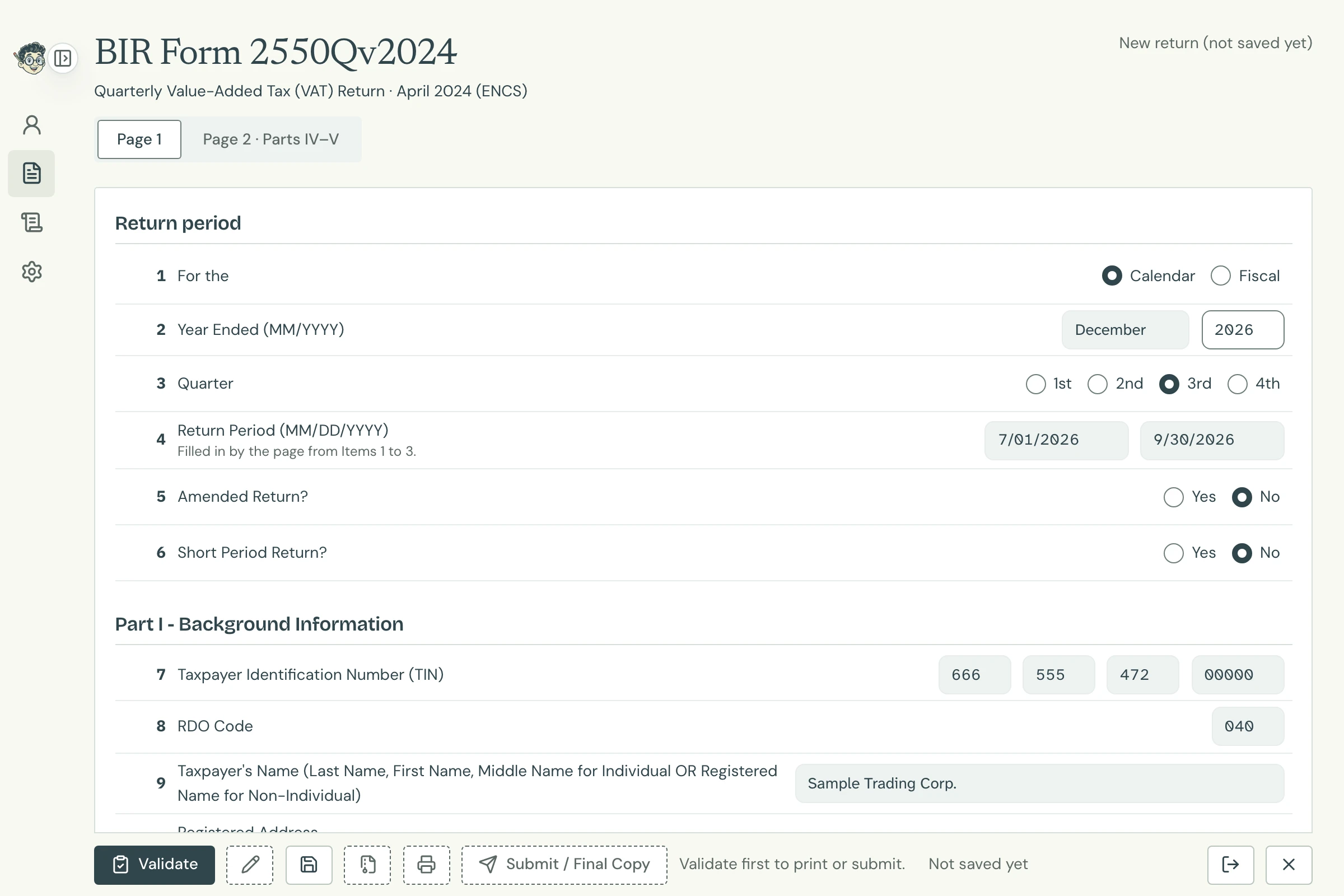
Page 1 Open full size -
Click Page 2 · Parts IV–V and type the quarter's sales and purchases in column A. Tax Techie works out the output and input tax at 12% in column B, as Offline eBIRForms does, and carries the totals to Item 61 and to Part II on Page 1.
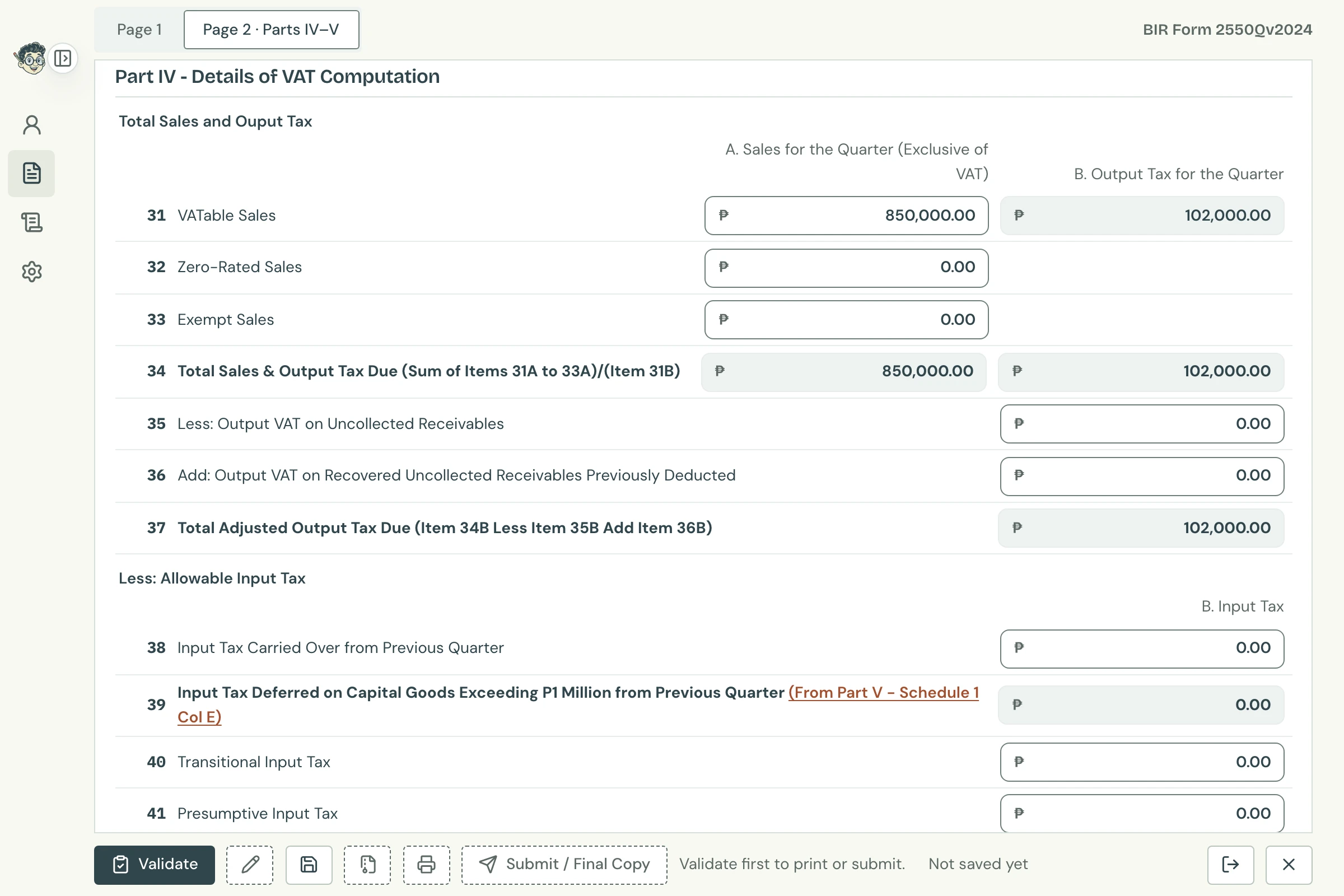
Part IV, Items 31 to 37 Open full size -
For Schedules 1, 3 and 4, click Add row under the schedule: its rows open in a window, as Offline eBIRForms' pop-up. Type each row, then click Save and Close: the rows are checked then, and their totals go to the schedule and to Part II or Part IV. To change them later, click Change rows. Schedule 2 is typed on the page. Choose the year and quarter (Items 2 and 3) before Schedule 3's or 4's rows: their dates are checked against the return period.
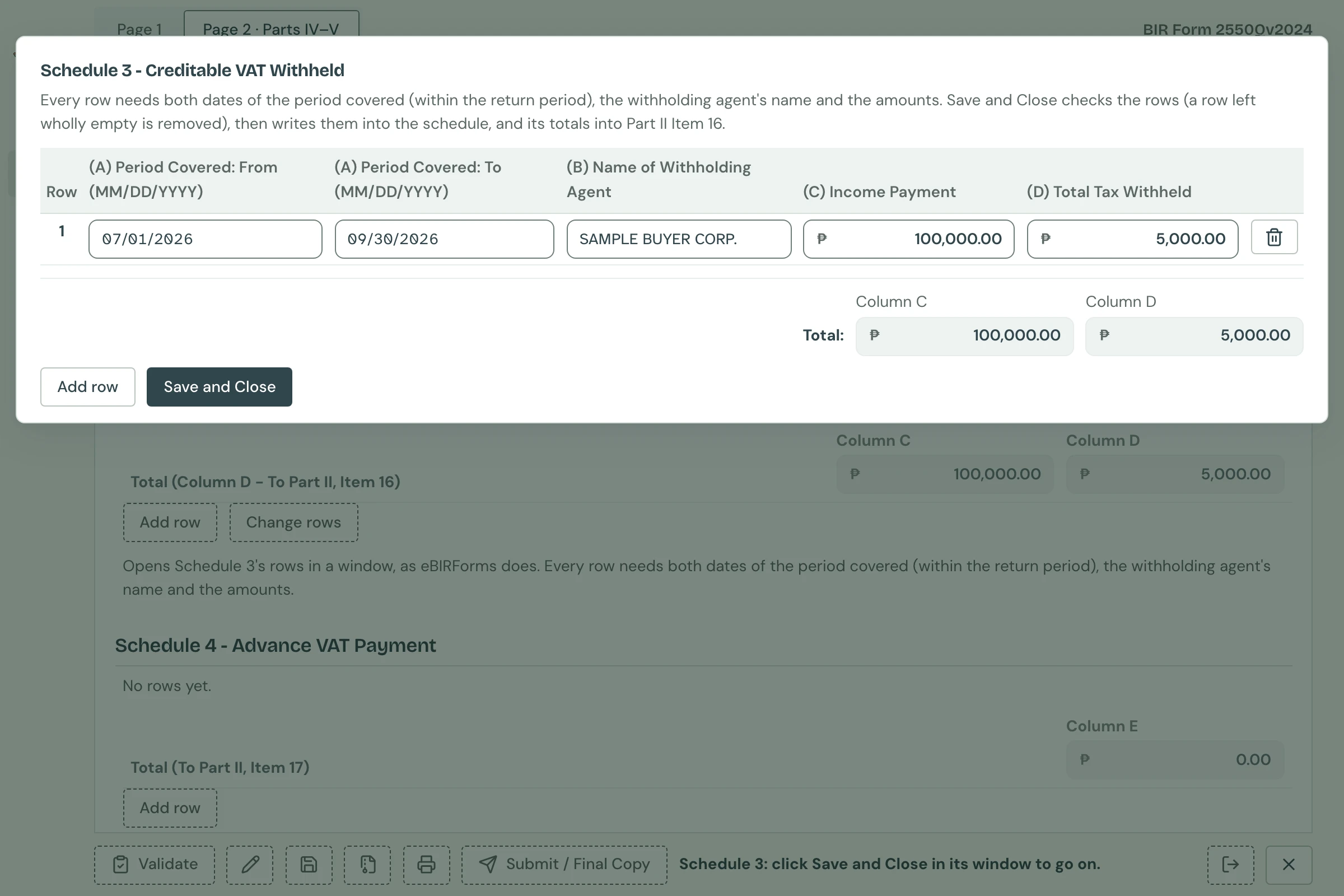
Schedule 3 Open full size -
For other credits (Item 19) or other input tax, purchases or deductions (Items 42, 47 and 56), type the description and amount. For more than one, click Add row under the item: its own rows open under it. Type each one, then click Save and Close: the item reads VARIOUS with their total. To change them later, click Change rows.
-
Click Validate, then Save, then send it with Submit / Final Copy.
Its printout is page 1 on one Legal sheet and page 2 on one or two, as Offline eBIRForms prints it: a page 2 with many schedule rows goes on to a second sheet. A page 2 too long for two sheets isn't printed, and Tax Techie says why.

Why does Item 19 print VARIOUS? An item made of rows prints VARIOUS with their total, as in Offline eBIRForms, and the rows aren't listed. Attach your own list of them with the proof.
Messages for this form
Tax Techie shows BIR's Offline eBIRForms messages word for word. The ones you're most likely to see:
| Message | What to do |
|---|---|
Please choose a year type on Item 1. |
Choose Calendar or Fiscal in Item 1. |
Item 3 is a required field. |
Choose the quarter in Item 3. |
Should not accept advance filing. |
The quarter hasn't ended yet: check Items 2 and 3. The return is due after its quarter ends, not before. |
Please choose taxpayer classification on Item 13. |
Choose micro, small, medium or large in Item 13. |
Specify cannot be empty field on item 14A. |
Item 14 says Yes: type the special law or treaty in Item 14A. |
Item 19 specify is a required field. |
Item 19 has an amount: type what it is. Items 42, 47 and 56 have messages of their own like it. |
Empty fields are not allowed |
A row has an empty field: fill it in, or delete the row. Tax Techie marks the row. |
Return Period must be defined. |
A row of Schedule 3 or 4 has dates, but the return period isn't set: choose the year and quarter (Items 2 and 3). |
Date fields cannot be empty. |
A row of Schedule 3 or 4 needs both dates of the period covered. |
'From' date cannot be after 'To' date. |
A row's period covered ends before it starts: check its dates. |
Only dates on or before December 31, 2021 are allowed. |
Schedule 1 takes only capital goods purchased or imported on or before December 31, 2021. |
Invalid input, then Accept only I and D |
Schedule 1's source code is I (importation) or D (domestic purchase). |