All guides
Your Tax Techie address for BIR's emails
Use your workspace's Tax Techie address as the taxpayer's email: BIR's confirmation emails are kept in your Cloud Vault, linked to each send.
Last checked November 25, 2026
Each workspace can have its own Tax Techie address, such as sampleaccounting@taxtechie.com. Use it as the taxpayer's email in Tax Techie: BIR's confirmation email for each return sent with it is kept in the workspace's Cloud Vault, linked to that send, with a PDF copy beside it. A copy can go to your own email too, so you still see it where you read your mail.
Before you start
- A Cloud Vault that is active. Every personal workspace has one, free; see Cloud Vault.
- The workspace's owner chooses the address, once. Staff use it.
Choose the workspace's address
- On the website, open the workspace's Cloud Vault page. Under the summary, Your Tax Techie address shows the workspace's address, or Choose an address if it has none yet.
- Click Choose an address, and type the name before
@taxtechie.com: 3 to 20 letters, numbers and single hyphens, such assampleaccountingorsample-accounting. If a name can't be had (taken, kept for Tax Techie's own use, or not allowed), the box says so as you type. - Type the name again, and click Choose this address. It can't be changed later: choose a name you'll be glad to give BIR for years.
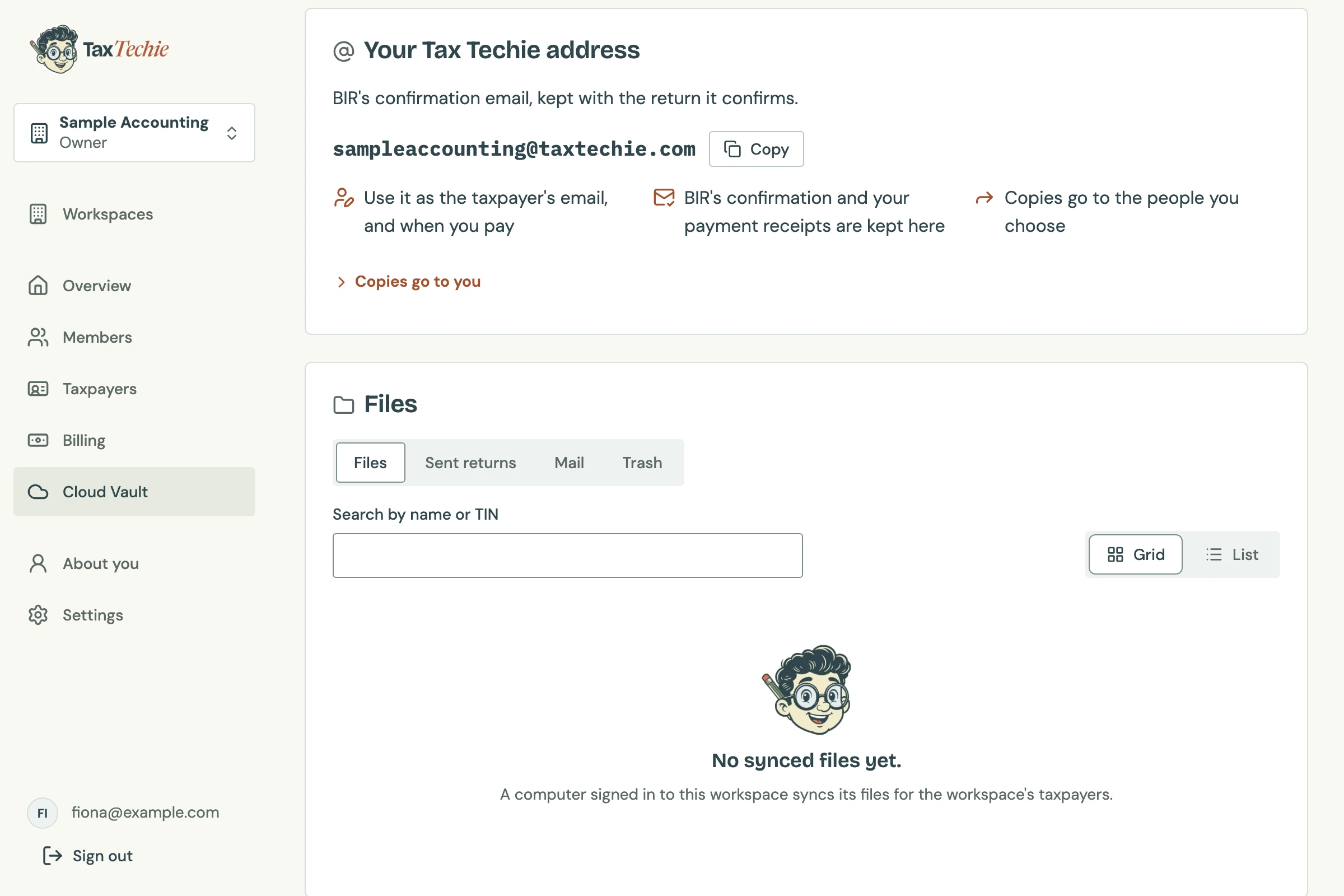
For a moment it says the address is being set up. Once it shows with Copy, mail sent to it comes to the Cloud Vault.
Use it as the taxpayer's email
- In the app, open the taxpayer's profile. Beside Email address, click the envelope icon (Use your workspace's Tax Techie address). Tax Techie fills in the workspace's address. Type it again where the app asks you to confirm it, as with any email.
- Save the profile, and send the taxpayer's returns as usual with Submit / Final Copy. BIR sends its confirmation email to the address in the return.
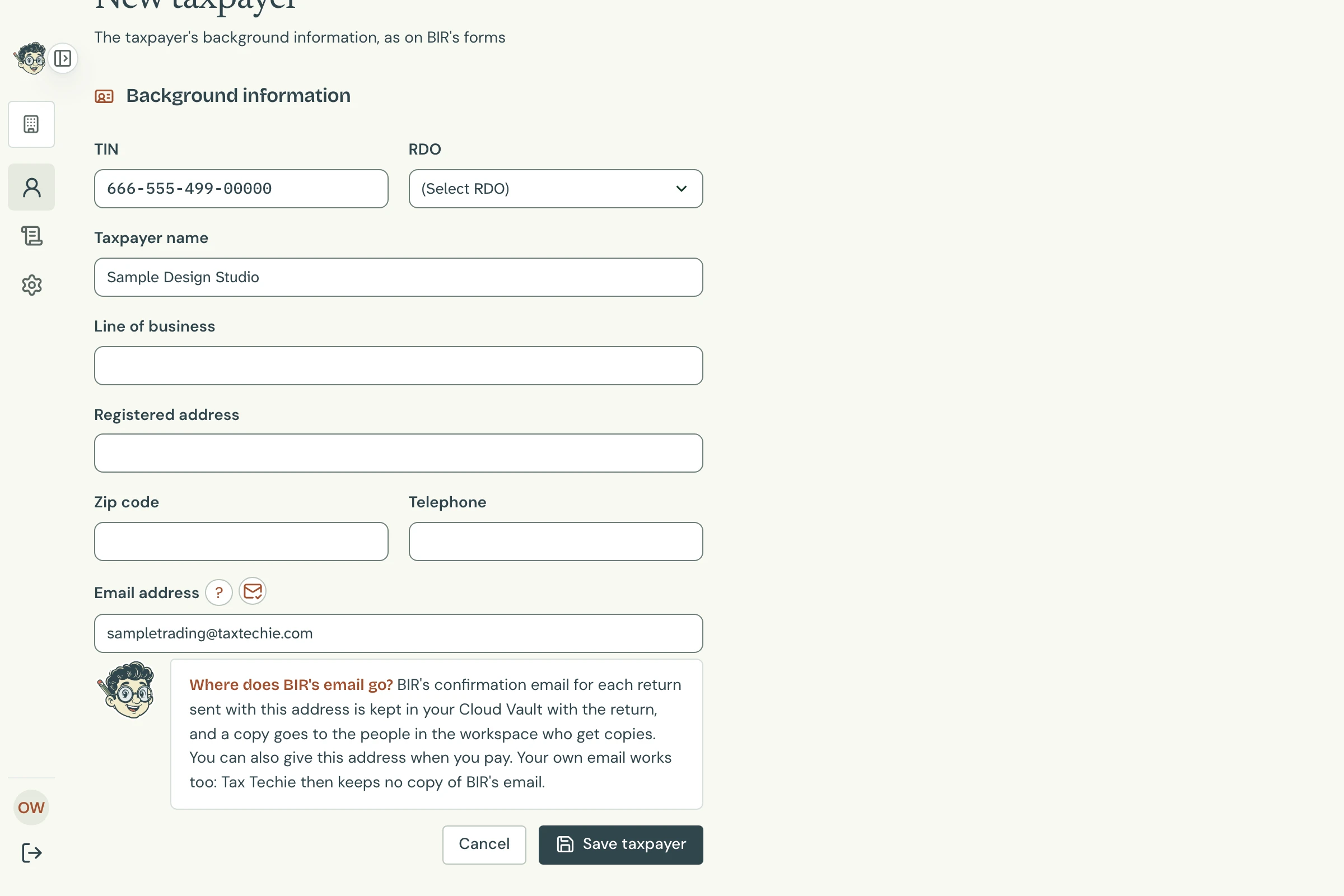

Should every taxpayer use it? It's your choice per taxpayer. A taxpayer's own email works too: BIR's email then goes only to that mailbox, and Tax Techie keeps no copy of it.
You can also give the address when you pay BIR through a payment channel: receipts from the payment channels Tax Techie knows are kept in the Cloud Vault too.
If a profile has another Tax Techie address (another workspace's, or a typo), the app warns you under the field, with Use this workspace's address, and again when you send.
Where BIR's email shows
BIR's email can take hours or days to arrive after a send. Once it comes:
- The Sent returns tab shows
BIR's confirmation email: kepton the send it is about, with Download PDF and Download original (.eml). - The Mail tab lists every email that came to the address, newest first: BIR's confirmation emails, payment receipts and other mail, a row each with what it is, its subject, who sent it, when it came, and its first tag (+2 more, for example, shows the rest). Its button downloads the PDF copy, or the original email while there is no PDF. Details shows every tag, the taxpayer, the send it is linked to and BIR's own lines; More holds its other actions. Filter by taxpayer or kind, or show only the emails that need a send.
- In the app, a sent return's Sent status says
BIR's email is in your Cloud Vault.when you point to it.
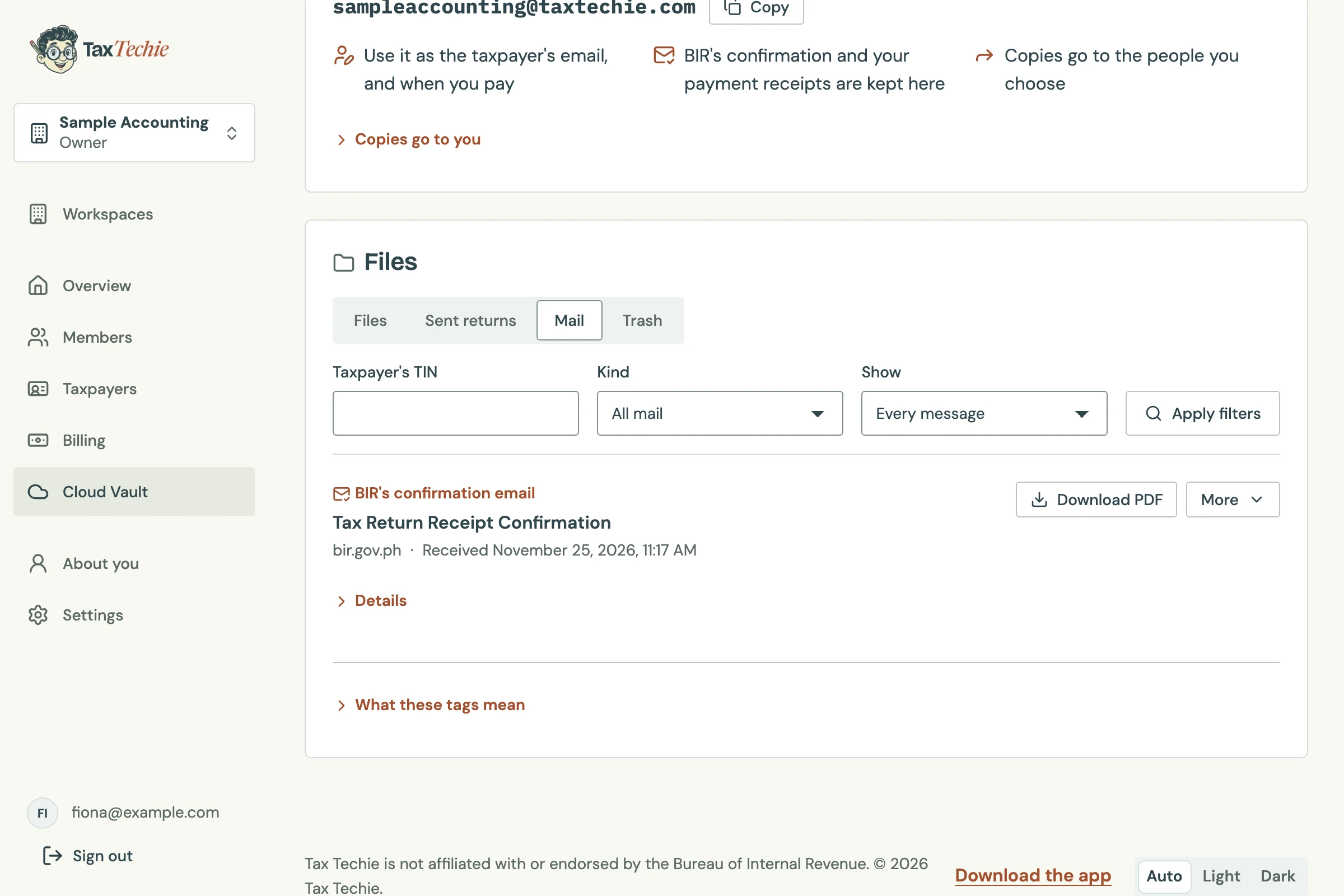
Its Details show the lines BIR's email has, such as File name: and its date and time, exactly as BIR wrote them. BIR's email is BIR's word on your return: Tax Techie keeps it as it came and never changes it. Who sent it shows as a name and domain once the sender is verified, and as the full address when it isn't.
When it isn't linked by itself
- Needs a send: Tax Techie couldn't tell which send BIR's email is about, for example because the return was sent from somewhere else. Its Details open by themselves: click Link to this send beside the send it lists, or Link to a send… under More to choose one. The owner and staff with Send returns can link it, and change it later.
- Sender not verified: the email says it's from BIR or a payment channel, but that couldn't be checked, so it isn't linked by itself. It's kept for a year. Keep in Cloud Vault, under More, keeps it for good and makes its PDF.
- Other mail: anything that isn't from BIR or a payment channel. It's deleted after the 30 or 90 days its tag says, unless you choose Keep in Cloud Vault under More.
What these tags mean, under the list, explains every tag an email can have.
Copies to your own email
Each email from BIR or a payment channel is also sent to the people in the workspace who get copies, from vault@taxtechie.com, with the original attached unchanged. Other mail is never copied.
- The owner gets copies from the start. Under the address, Copies go to… says who gets them (for example
Copies go to you and 2 others), and opens to list each one; Stop my copies and Send me copies turn your own on and off. It opens by itself when an address bounced. - Staff who see the vault for every taxpayer can turn their own copies on in Settings, under Cloud Vault. Staff limited to some taxpayers don't get copies.
- While the workspace's Cloud Vault isn't active (it isn't paid for, or the workspace is closed), copies go to the owner only, and staff whose copies are on see
Paused while the Cloud Vault isn't active. - If a copy can't be delivered (the mailbox refuses it), copies to that address stop and the owner is emailed. The email itself is still kept in the Cloud Vault. Turn the copies on again once the mailbox works.
Questions
Who sees the emails?
The owner, and staff with See the vault, for the taxpayers they work on. An email whose taxpayer couldn't be told is shown only to the owner and to staff who see every taxpayer. Tax Techie's team sees only an email's sender, subject, size and workspace, when it needs to fix a problem, never what it says, unless the law requires it or the workspace's owner asks. One more exception: while the email service's storage is failing, an email is sent whole to a mailbox of Tax Techie's, opened only to put it back in your Cloud Vault, then deleted from that mailbox.
How long are they kept?
BIR's confirmation emails and payment receipts are kept in the Cloud Vault like a sent return's files, until the owner deletes them to the trash, or two years after the Cloud Vault stops being paid for (the owner can download them until then). Emails whose sender wasn't verified are kept for a year, and other mail for 30 or 90 days, unless you keep them. Kept emails use the Cloud Vault's space, as files do.
Who receives the mail for Tax Techie addresses?
A third-party email service receives mail sent to Tax Techie addresses and holds it until Tax Techie has it, then for 30 days. It may be processed outside the Philippines. Tax Techie then keeps it in your Cloud Vault as above.
What if the Cloud Vault is full, or not paid for?
Nothing is lost. If the Cloud Vault is full, the email waits, tagged Waiting for room, and is saved by itself once there is room; its copy is still sent. If the workspace's Cloud Vault isn't paid for, emails that come are kept, and only the owner sees them, and gets their copies, until the Cloud Vault is paid for again.
Can I change the address?
No: an address is chosen once, so BIR's emails for returns you already sent always come back to the same workspace. If an address is ever retired, mail sent to it still reaches the workspace, and it is never given to anyone else.